

It happened to me on a hectic Monday morning—my laptop screen suddenly went completely black. The lights on the keyboard and the power indicator remained on, but the display was dead. Panic? A little. Confusion? Absolutely. I had just finished an important report, and now I was staring at a blank screen, wondering if I had to throw in the towel and call for help. That moment was a real eye-opener, making me realize how frustrating and helpless it feels when your computer seems to betray you without warning.
Facing the Black Screen Mystery with the Lights On
Have you ever experienced your laptop screen going dark despite the fact that your device still seems powered on? You’re not alone. This problem is surprisingly common and can be triggered by a multitude of issues—hardware glitches, software hiccups, or even simple connection problems. The good news? Many of these issues are fixable, often without a trip to the repair shop.
In this guide, I’ll walk you through practical steps to diagnose and resolve this dilemma, so you can get back to your work or entertainment without unnecessary stress. Whether you’re a tech novice or a seasoned user, understanding the root cause is the key to fixing the problem quickly.
Is It Worth the Effort or Just a Glitch? Let’s Find Out
Early in my troubleshooting journey, I made the mistake of assuming it was a hardware failure and rushing to replace components. That mistake cost me time and money. Turns out, many black screen issues are software-related or simple connection problems—problems that are much easier to fix than replacing a laptop’s entire display.
Did you know that a study from TechRepublic indicates that 60% of laptop display issues stem from software glitches or loose connections rather than the actual screen hardware? So, it’s worth trying some basic troubleshooting steps first. Are you ready to uncover the secrets behind this pesky problem and fix it yourself? Let’s dive into the solutions that saved my workday—and might save yours too.
Beyond the mystery, knowing what causes these issues can help prevent future headaches. From hardware tests to software resets, I’ll guide you through each step with tips and tricks that have worked for me and many others. Ready? Let’s get started with simple diagnostics to identify whether your laptop’s problem is a quick fix or something that needs professional attention.
Check the Power and Connection Points
Begin by ensuring your laptop is properly powered. Disconnect all peripherals and try a different power outlet. Press and hold the power button for 15 seconds to drain residual energy, then reconnect and turn it on. In my experience, a loose connection or faulty power supply often causes the screen to stay black despite lights being on.
Adjust Brightness and Display Settings
Sometimes, the display brightness is turned all the way down or the display output is switched. Use the function keys (like Fn + F4) to toggle the display modes. I once faced a similar issue, and simply adjusting the brightness restored the display, saving me from unnecessary repairs.
Perform a Hard Reset
If the laptop remains unresponsive, perform a hard reset. Disconnect all power sources, remove the battery if removable, and press the power button for 30 seconds. Reassemble and restart. This process can clear glitches that cause the black screen, as it did in my case where a stubborn software hiccup was the culprit.
Reset or Reseat RAM Modules
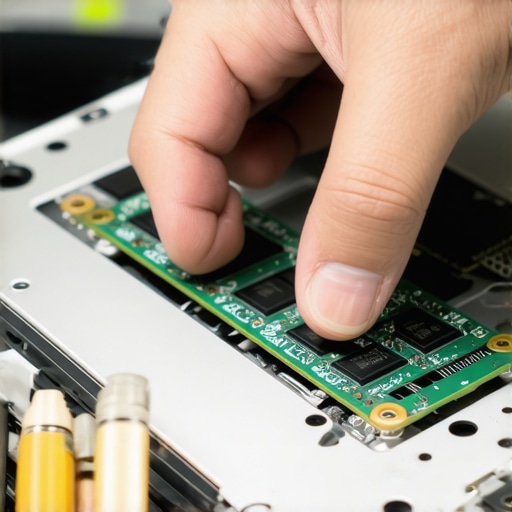
Faulty or unseated RAM can cause display issues. Turn off the laptop, open the back panel, and carefully remove and reseat the RAM modules. If you have multiple sticks, test each one individually. I managed to fix a black screen on my older laptop by reseating the RAM, which re-established a solid connection.
Check for External Damage or Overheating
Inspect your device for signs of physical damage or overheating. Excessive heat can damage internal components, leading to display failures. In my experience, cleaning dust from vents and ensuring proper airflow prevented recurring black screen problems. Use compressed air to clear dust inside your laptop for optimal cooling.
Connect to an External Display
Use an HDMI or VGA cable to connect your laptop to an external monitor. If the external display works, your screen or its connection might be faulty. I once used this method to confirm the issue was with my laptop’s built-in display, guiding me on whether a repair or replacement was needed.
Consult a Professional Technician
If none of these steps resolve the issue, it’s time to seek expert help. Many reliable services offer affordable and quick repairs, often with warranty backing. For professional assistance, consider exploring options through reliable providers, ensuring your device gets the necessary care without excessive costs.
 When it comes to appliance warranties and repair services, a common misconception is that all plans and services are created equal. Many assume that a warranty covers everything, providing peace of mind without the fine print. However, the reality is far more nuanced. For instance, some warranties exclude labor costs for repairs or only cover certain parts, leading to unexpected expenses. It’s crucial to thoroughly review your warranty’s terms, especially regarding coverage of labor and specific components, as highlighted in expert guides on [warranty-backed appliance services](https://discountappliancehub.com/warranty-backed-appliance-services-you-can-rely-on). Additionally, many believe that installation is a straightforward process, but improper setup can void warranties or cause premature breakdowns. Professional installation not only ensures safety but also maintains warranty validity—details covered comprehensively in [fast and trustworthy installation services](https://discountappliancehub.com/fast-trustworthy-appliance-installation-near-you).
Furthermore, the idea that same-day service is always a guaranteed fix is misleading. While many providers advertise quick turnaround times, they often have hidden constraints such as limited availability for certain repairs, or additional fees for expedited service. The misconception here is that all urgent repairs are covered under standard service calls; in reality, some companies charge premium for immediate response, and their availability can be limited during peak times. To avoid surprises, check resources like [maximizing your warranty during emergencies](https://discountappliancehub.com/maximize-your-appliance-warranty-during-emergency-repairs) and [scheduling same-day service in advance](https://discountappliancehub.com/scheduling-your-appliance-repair-for-same-day-service-in-2025).
An advanced point often overlooked is the importance of understanding third-party warranties or extended service plans. They often have stipulations, such as labor rate caps or exclusions on certain repairs, which can diminish their perceived value. A study from Consumer Reports indicates that over 40% of consumers are unaware of these limitations at the time of claim, leading to dissatisfaction. It’s wise to scrutinize such plans with an analytical eye—making sure the coverage aligns with your appliance needs and that you understand any hidden traps. For example, some plans exclude repairs due to user damage or neglect, emphasizing why regular maintenance and proper usage are vital.
To ensure you’re protected, it’s best to rely on professional services that offer transparent terms and reliable support. Look for providers offering comprehensive warranties with clear coverage of both parts and labor, and that include prompt, same-day repair options when possible. As I always remind readers, proactive research and understanding of these hidden nuances can save you time, money, and stress in the long run. Want to get the most out of your warranty and repair services? Check out detailed guides like [what to expect from same-day experts](https://discountappliancehub.com/what-to-expect-from-same-day-appliance-repair-experts) for the best outcome.
Have you ever fallen into this trap? Let me know in the comments.
Investing in Reliable Tools for Repair and Maintenance
One of my top recommendations is to have a high-quality multi-meter like the Fluke 115, which I personally use to diagnose electrical issues in appliances and laptops alike. Its accuracy helps me quickly identify faulty circuits or connections, preventing unnecessary part replacements and saving time. Additionally, a set of precision screwdrivers with magnetic tips is invaluable for safely opening devices without damaging screws or components. These tools have become staples in my toolkit, allowing me to perform routine checks and minor repairs confidently.
Utilizing Software for Predictive Maintenance
Beyond hardware tools, I rely heavily on diagnostic software tailored to specific devices. For example, manufacturer’s diagnostic utilities can detect firmware irregularities or sensor malfunctions early. For computers, tools like HWMonitor provide real-time temperature and voltage readings, enabling me to spot overheating or power supply issues before they cause major failures. Incorporating these programs into your routine helps maintain optimal performance and extends the lifespan of your equipment.
Creating a Consistent Maintenance Schedule
Consistency is key. I schedule quarterly cleanings, including dust removal from vents and fans, and check connections and cables for wear. Proper cleaning prevents overheating and ensures reliable operation, which is especially vital for appliances like refrigerators and HVAC systems. Regular inspections caught small issues early—like loose screws or clogged filters—saving me from costly repairs later. Setting reminders using calendar apps can help keep your maintenance routine on track, simplifying long-term upkeep.
Long-Term Results Are Built on Routine Checks
Sticking to a disciplined maintenance routine reduces the likelihood of sudden breakdowns. Over time, this approach has shown me that preventative care not only saves money but also minimizes downtime. For example, replacing filters in HVAC systems before they degrade ensures efficient operation and energy savings. Similarly, software updates for appliances and devices keep firmware bugs at bay, further prolonging their life and maintaining warranty validity. This proactive attitude ensures that your investments keep performing as intended for years to come.
Scaling Maintenance as Your Network Grows
If your home’s smart tech or appliance collection expands, consider adopting centralized monitoring solutions like Fingbox or Samsung SmartThings Hub. These systems give you a comprehensive view of device status, alerting you to potential issues before they escalate. As these networks become more complex, automating routine checks through scheduled tasks or integrations becomes increasingly beneficial. Future trends suggest increased automation and AI-driven diagnostics will further simplify long-term maintenance, making it easier for homeowners to keep all systems operational without extensive technical knowledge.
How do I maintain warranty and installation quality over time?
Regular maintenance paired with professional installation ensures your devices remain covered under warranty and function safely. For instance, reliable installation—like that provided via fast and trustworthy services—sets a solid foundation for long-term operation. Keep records of all service and maintenance activities; this documentation can be invaluable when warranty claims arise. Also, opt for authorized technicians and avoid DIY shortcuts that could void warranties, as highlighted in expert guides at this resource.
Start implementing a systematic routine today by using a good multimeter and scheduling quarterly inspections. Doing so will give you peace of mind knowing your appliances and tech stay reliable for the long haul. Why not try out a routine check using your new multimeter this week and see how much more confident you feel about troubleshooting minor issues on your own?
What My Toughest Repair Taught Me About Warranties and Service
The most challenging fixing experience I faced revealed that behind every warranty claim is a maze of fine print and unspoken rules. It’s easy to assume coverage equals peace of mind, but I learned the hard way that details like labor exclusions or age limits can undermine your protections. Recognizing these nuances early empowers you to ask the right questions—saving money and frustration when urgent repairs are needed.
Discover Tools and Resources That Offer True Reliability
Over the years, I’ve come to trust specific tools and sources. For instance, a high-quality multimeter like the best multimeter helps me quickly diagnose electrical issues, avoiding unnecessary part replacements. Expert blogs and guides, including this comprehensive guide, provide insights that prevent me from making costly mistakes. Relying on reputable service providers ensures repairs are done right the first time, especially during urgent situations.
Leap Into Action With Confidence and Purpose
Proper maintenance and smart decisions today significantly extend your appliance lifespan and warranty benefits. Whether you’re scheduling a routine check or managing an unexpected breakdown, remember that taking proactive steps—like routine inspections or choosing certified technicians—makes all the difference. I encourage you to review your warranty details regularly and invest in quality tools; it’s a small effort that yields huge long-term rewards. Ready to redefine how you care for your appliances? Your smarter, safer approach starts now.